An old Kindle as a Home Assistant wall calendar – and the battery bug that took two weeks
Contents
An e-ink screen is the perfect wall calendar: readable in daylight, no glowing panel in the hallway, and it only needs power when the picture changes. I had an old Kindle lying around, and Home Assistant already knows our calendars and the weather. So the goal was simple: show the next two weeks of appointments plus a weather forecast, refresh twice a day, and don’t make me charge it every other day.
The first two parts took a day. The third took two weeks.
This project was built with Claude (an AI) doing the hands-on work over SSH on the Kindle, while I held the device, made the decisions and occasionally plugged it in. That shaped the project more than I expected – more on that at the end.
The hardware surprise
The first lesson came before any code: the Kindle I thought was a Paperwhite 3 is a Paperwhite 2. The tool
fbink -e reported the device name, and the difference matters: the PW2 screen is 758×1024 at 212 DPI, not
1072×1448 at 300 DPI. Every layout coordinate depends on that.
The device runs firmware 5.11.2 and was jailbroken with WinterBreak. On top of that: KUAL (a launcher for extensions), usbnet for SSH over Wi-Fi, and FBInk, which draws text and images directly to the e-ink framebuffer.
Why the Kindle renders the calendar itself
The common approach is to render a PNG on a server and let the Kindle download it as a screensaver. I went the other
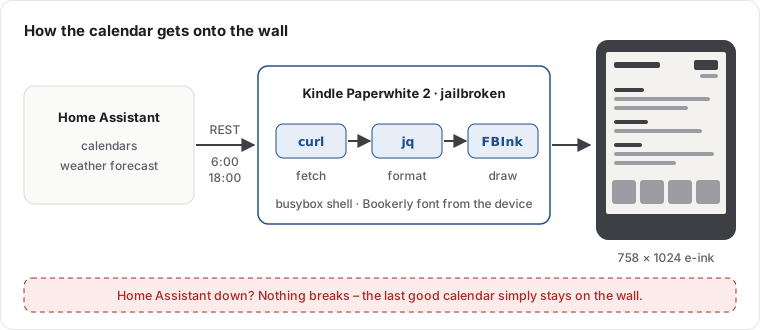
way: the Kindle fetches the data and draws everything itself. It calls the Home Assistant REST API with curl,
formats the result with jq and draws it with FBInk, using the Bookerly font that is already on the device.
With on-device rendering, the last good calendar stays on the wall. No broken image, no error page.
Some things that weren’t obvious:
- The Kindle UI has to go. As long as the Kindle “framework” runs, the reading interface repaints over the calendar. Stopping it is fine: Wi-Fi, SSH and the power management keep working.
- Ghosting. A normal clear leaves the previous screen faintly burned in. Only a full flashing refresh
(
fbink -f -w -k) gives a clean page. - Columns with a proportional font. A padded string never lines up. The four-day forecast strip is drawn as four separate FBInk calls at fixed x positions.
- Modern Home Assistant has no
forecastattribute anymore. The forecast comes from theweather.get_forecastsservice call, and the response is wrapped inservice_response. - The shell is busybox
ash. No process substitution,dateonly speaks English – German day and month names are mapped in the script.
After the first day it worked: agenda in the middle, current temperature top right, four-day forecast at the bottom, refresh at 06:00 and 18:00, survives a reboot unattended.
Then the battery was flat the next morning.
The battery: three theories, two of them wrong
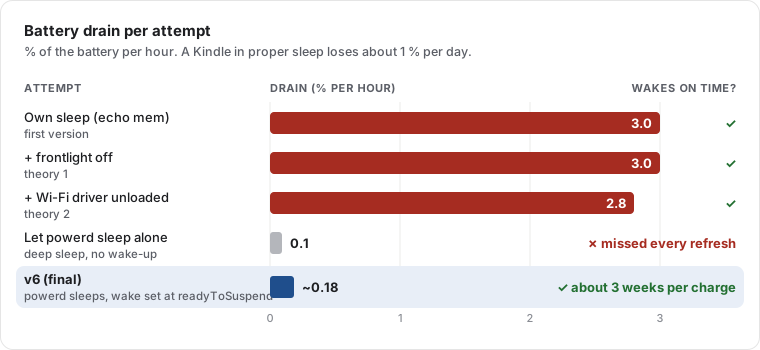
A Kindle in proper sleep loses about one percent per day. Ours lost three percent per hour.
The loop at the time worked like most guides suggest: draw, set the hardware clock alarm to the next refresh, put the
device to sleep with echo mem > /sys/power/state, repeat. The wake-ups were accurate to the second. The battery was not.
Theory 1: the frontlight. The framework owns the frontlight, we had stopped the framework, so whatever brightness it had was simply left on – measured at level 7. That was real and got fixed (turning it off needs both the powerd property and writing 0 to the backlight device). Drain afterwards: still 3 % per hour. Wrong theory.
Theory 2: the Wi-Fi radio. Wi-Fi came back instantly after every wake, so the radio never seemed to power down. We unloaded the Wi-Fi driver before each sleep and reloaded it after. Drain: 2.8 % per hour instead of 3.0. Also wrong.
Theory 3: our own sleep is shallow. A logger writing every 5 seconds proved the CPU really stopped – a clean 181-second gap during sleep. So the device was sleeping. But the battery’s current sensor told the real story:
| State | Current |
|---|---|
| Awake, idle | ~62 mA |
Our own sleep (echo mem) |
~40 mA |
| The Kindle’s own sleep (powerd) | ~1.4 mA |
Writing to /sys/power/state skips everything the Kindle’s power daemon (powerd) does before sleeping, so half the
hardware stays powered. That was the actual problem, and it needed two weeks and a lot of measuring to see clearly.
The trade-off nobody warns you about
The obvious fix: don’t sleep ourselves, let powerd do it. Result: 0.1 % per hour – excellent – and the calendar missed every refresh. powerd’s sleep is deep, but our alarm never woke it – it slept 13 hours past its target.
So: our sleep woke on time but drained the battery. powerd’s sleep saved the battery but never woke up. Asking powerd
to schedule a wake (rtcWakeup) was refused with an “invalid state” error – whatever we tried.
The fix: ask at the right moment
The breakthrough came from an article on ragman.net about doing the same on an older Kindle:
powerd only accepts a wake request in one specific moment – right before it goes to sleep, when it announces
readyToSuspend. Ask a second earlier or later and it’s “invalid state”.
So the final design (version 6, in production since mid-September) never puts the device to sleep itself. It listens to powerd’s events and answers at exactly the right time:
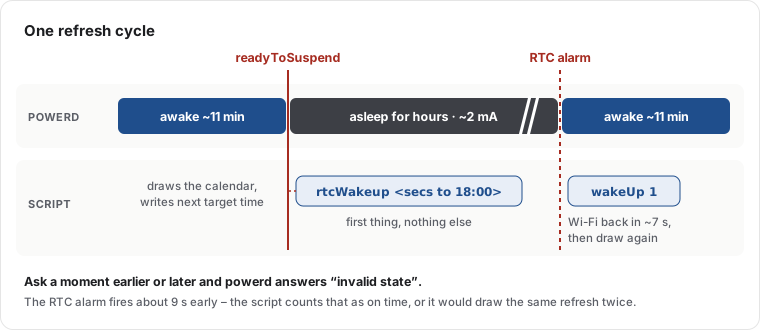
The event loop, simplified:
# Simplified sketch of the event loop
lipc-wait-event -m com.lab126.powerd readyToSuspend,wakeupFromSuspend |
while read -r event _; do
  case "$event" in
    readyToSuspend)
      # The only moment powerd accepts a wake request. Do this first, nothing else.
      lipc-set-prop -i com.lab126.powerd rtcWakeup "$(( NEXT_REFRESH - $(date +%s) ))"
      ;;
    wakeupFromSuspend)
      # Woken by the alarm, but Wi-Fi stays off: simulate a button press.
      lipc-set-prop -i com.lab126.powerd wakeUp 1
      render_cycle &   # never block the event handler
      ;;
  esac
done
The first production run: slept 6.4 hours, woke at 17:59:51 for the 18:00 refresh, about 2 mA while asleep and roughly 2.6 mA averaged over a full cycle including the wake-up. That works out to roughly three weeks per charge instead of one day.
Two last details showed up in production: the hardware clock wakes about 9 seconds early, which made the loop draw
the same refresh twice until “close enough” counted as done. And a separate process (blanket) painted the stock
screensaver over the calendar whenever powerd went to sleep – it has to be told to unload the screensaver after every boot.
What I’d tell anyone trying this
- Measure current, not percentages. The fuel gauge reports the current during sleep (
dmesg | grep "fg resume"). Waiting hours for the battery percentage to move is how you lose a week. - Wait for a clock time, never for a duration.
sleep 43152doesn’t advance while the device is asleep. One refresh vanished completely because of that. - Don’t fight the platform’s power manager. Work with its events.
- Over SSH,
/sbinisn’t in the PATH.rebootfails silently. Always check that a reboot really happened. - Keep the log before deleting it. One night of evidence got lost that way.
Working with an AI on this
This was a good test of what an AI can do on real hardware. Claude did the SSH sessions, wrote the scripts, set up the measurements and kept notes of every finding – including the wrong ones, which is why I can tell this story with numbers. My part was the direction, the decisions, and physically handling the device when it was unreachable.
What stood out: the AI was happy to state a theory, and just as happy to drop it when the measurement disagreed. The frontlight and Wi-Fi theories were both plausible and both wrong, and the notes say so plainly. The fix came from combining measurements with a blog post from someone who had fought the same daemon on a different Kindle.
The calendar has been on the wall since. It’s the most useful old e-reader in the house.